Wednesday, August 9, 2017

AMD Ryzen Threadripper 180W CPUs Will Ship With Liquid AIO Cooling Solutions – X399 Platform Launches on 10th August

AMD is expected to release their high-end Ryzen Threadripper processors in early August but we have some more information at our hands, thanks to Hermitage Akihabara. The HEDT processors will be featured on the new AMD X399 platform which was showcased at Computex 2017.

AMD Ryzen Threadripper HEDT CPUs Shipping On 10th of August With Liquid Cooling Solutions

The AMD Ryzen Threadripper family will initially feature just two SKUs. These include the Ryzen Threadripper 1950X and the Ryzen Threadripper 1920X. The processors feature 16 and 12 cores, respectively. Both chips will be available for pre-order on 27th of July and will hit market in early August. The source confirms that the Ryzen Threadripper chips will be available on 10th August (Thursday). AMD will also release the X399 platform at the same day to ensure users are fully prepped at launch day.
The other news is that all Ryzen Threadripper processors will ship with a liquid cooling solution. Now it’s not known if there will be separate version of Ryzen Threadripper processors that ship with and without the bundled cooler but at the given price, it sounds good enough. It should be noted that Ryzen Threadripper will require a new range of cooler with large surface area since a Threadripper chip is bigger compared to mainstream and even Intel’s Core-X familyon the X299 socket.
This also wouldn’t be the first time AMD has shipped liquid cooling solutions with their processors. AMD released several Bulldozer and Piledriver CPUs with water cooling solutions. The 5 GHz CPUs which include the FX-9590 and FX-9370 shipped with 220W TDP out of box and had liquid coolers bundled in the revised packages. The Threadripper chips feature TDPs of 180W which means that they will require some beefy cooling solutions to keep steady in workloads that require lots of crunching power.

The coolers will be complex to design as the Threadripper socket TR4 (LGA 4094) is more than twice the size of a mainstream socket. Not only is it bigger in size, the socket almost ends up near the top most PCIe slot on many X399 boards which means that users will have to purchase a new range of coolers if they want to replace the bundled liquid cooling solution. Noctua displayed new coolers at their Computex 2017 booth that were designed specifically for the TR4 socket and their contact plate looks massive.

AMD Ryzen Threadripper 1950X 16 Core $999 US Processor

The AMD Ryzen Threadripper 1950X is the flagship chip of the Threadripper X399 family. The chip features 16 cores, 32 threads. Clocks are maintained at 3.4 GHz base, 4.0 GHz boost and the XFR technology should help it gain The chip will carry 32 MB of L3 cache and 8 MB of L2 cache which totals 40 MB. There will be a total of 64 PCIe lanes available on the processor of which 60 can be used by discrete graphics cards and PCIe NVMe storage devices. The chip will cost $999 US when launched.

AMD Ryzen Threadripper 1920X 12 Core $799 US Processor

The second chip in the lineup is the Ryzen Threadripper 1920X which features 12 cores and 24 threads for a price of just $799 US. Intel’s 12 core chip in comparison costs $1200 US. The chip features clock speeds of 3.5 GHz base and 4.0 GHz boost. Keeping things in line and if the chip comes with the same die configuration as 1950X, we will be looking at 32 MB of L3 cache and 6 MB of L2 cache which totals to 38 MB total cache size. The chip will feature the same amount of PCIe lanes as the 1950X.

AMD Ryzen Threadripper Official Cinebench R15 Performance Results:

Both chips will feature a 180W TDP which is higher compared to the Intel Core X offerings that max out at 165W. It remains to be seen how these chips fare against the Intel parts in terms of efficiency as Intel isn’t doing particularly well in that area.
WccftechCores/ThreadsBase ClockTurbo ClockL2 / L3 CacheTDPMSRP
Ryzen Threadripper 1950X16/323.4 GHz4.0 GHz8 MB / 32 MB180 Watts999 USD
Ryzen Threadripper 195016/32TBCTBC8 MB / 32 MB180 WattsTBC
Ryzen Threadripper 1920X12/243.5 GHz4.0 GHz8 MB / 32 MB180 Watts799 USD
Ryzen Threadripper 192012/24TBCTBC8 MB / 32 MB180 WattsTBC
Ryzen Threadripper 1900X8/163.8 GHz3.0 GHz4 MB / 16 MBTBC549 USD
Ryzen Threadripper 19008/16TBCTBC4 MB / 16 MBTBCTBC
Ryzen 7 1800X8.163.6 GHz4.0 GHz4 MB / 16 MB95 Watts499 USD
Ryzen 7 1700X8.163.4 GHz3.8 GHz4 MB / 16 MB95 Watts399 USD
Ryzen 7 17008.163.0 GHz3.7 GHz4 MB / 16 MB65 Watts329 USD
Ryzen 5 1600X6/123.6 GHz4.0 GHz3 MB / 16 MB95 Watts249 USD
Ryzen 5 16006/123.2 GHz3.6 GHz3 MB / 16 MB65 Watts219 USD
Ryzen 5 1500X4.83.5 GHz3.7 GHz2 MB / 16 MB65 Watts189 USD
Ryzen 5 14004.83.2 GHz3.4 GHz2 MB / 8 MB65 Watts169 USD

The World’s Fastest GeForce GTX 1080 Ti is Here – Meet The Colorful iGame GTX 1080 Ti KUDAN That Hits Almost 1800 MHz Out of Box, Features Hybrid Cooling Design

Colorful has officially unveiled the fastest GeForce GTX 1080 Ti model to date, their custom built iGame GTX 1080 Ti KUDAN. The new graphics card houses an enthusiast grade PCB that is fitted with a top of the line hybrid cooling solution.

Colorful iGame GTX 1080 Ti KUDAN Graphics Card Unveiled – The Fastest GeForce GTX 1080 Ti

There have been many top of the line GeForce GTX 1080 Ti launches in the past few months. We saw the MSI GTX 1080 TI Lightning Z, EVGA GTX 1080 Ti KINGPINASUS ROG GTX 1080 Ti Poseidonand the GALAX GTX 1080 Ti HOF. Colorful has a range of graphics cards based on the GTX 1080 Ti design that include the Vulkan X OC and the Neptune but they are taking things to the extreme on the iGame GTX 1080 Ti KUDAN.
The Colorful iGame GeForce GTX 1080 TI KUDAN is a monstrosity with a triple fan and triple slot design. The design of the shroud is very similar to the iGame GeForce GTX 1080 KUDAN but this card makes use of a hybrid cooling solution. As for the technical specifications, Colorful states that they have selected only the best GP102 GPUs for their iGame KUDAN graphics cards to ensure the best clock stability and overclocking performance.
Coming to the design of this card, we are looking at an insane 3-Slot form factor. The card uses the latest Waterspout Cooler II that houses a hybrid system and can take advantage of both air and liquid cooling. Users can either use the triple fan cooler which houses a beefy heatsink (aluminium-fin) based solution. Or they can attach the card to their custom water-loop for even better cooling performance. If you don’t have a custom loop PC, don’t worry, Colorful has included a detachable module which includes a radiator and an integrated pump for maximum cooling performance.
Power to the card is fed through dual 8-pin connectors which should be enough to power the electrical circuitry on the PCB. It should be mentioned that this card uses a high performance, custom PCB design, which should deliver better overclocking performance and stability. Display outputs on the card include 1x DVI, 2x HDMI and 2x DisplayPort. There’s no word on the price currently but we can expect to be paying higher than $800 US for this beast.

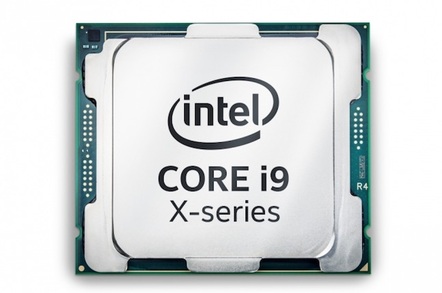
Core-blimey! Intel's Core i9 18-core monster – the numbers


Processor NameCore i9- 7980XE X-Core i9- 7960X X-Core i9- 7940X X-Core i9- 7920X X-Core i9- 7900X X-
Cores/ Threads18/3616/3214/2812/2410/20
Base Clock Speed (GHz)2.62.83.12.93.3
Turbo Boost Max Technology 3.0EnabledEnabledEnabledEnabledEnabled
Turbo Boost Max Technology 3.0 Frequency (GHz)Up to 4.4Up to 4.4Up to 4.4Up to 4.4Up to 4.5
L3 Cache24.75MB22MB19.25MB16.5MB13.75MB
Memory Support4 channels DDR4-26664 channels DDR4-26664 channels DDR4-26664 channels DDR4-26664 channels DDR4-2666
PCIE Lanes off CPU4444444444
TDP165W165W165W140W140W
Socket (LGA)20662066206620662066
1KU Pricing$1,999$1,699$1,399$1,199$999
Intel's pitching these new CPUs at gamers and graphics-wrangling professionals. The latter, the company says, can expect “20 per cent better performance for VR content creation and up to 30 per cent faster 4K video editing.”
If those numbers are accurate, plenty of Reg readers and the users they serve will want one of these before too long. If they insist on the top-of-the-line i9-7980 their desire will come at a cost of about $276 compared to the most expensive Core i7 currently on Intel's price list [PDF], the $1,723 i7-6950X. Lesser i7s range from $300 to $1,100 apiece, so even if users don't want the gruntiest i9 it's likely their new i9-powered machine will be more expensive than their last.
And it will almost certainly be a new machine, because the LGA 2066 socket the i9s need only appeared in motherboards as of June 2017. ®
Bootnote: We're staying out of performance comparisons to AMD for today, because without real product to test in the real world we're left with Intel's heavily-asterisked performance data, which always offers fabulous numbers. Perhaps too fabulous.

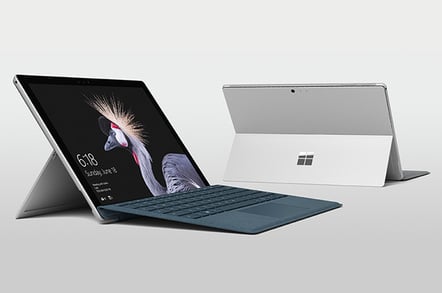
Microsoft Surface Pro (2017) review

Review Microsoft waited almost two years to update its boutique computer, the Surface Pro. In the meantime the line expanded to include a detachable tablet (Surface Book), a desktop (Surface Studio) and a proper laptop (Surface, er, Laptop), while the cheaper, Atom-powered POS (Plain Old Surface) fell into the bin and wasn't rescued. So do you want the tl;dr first?

Fine. This won't take long.

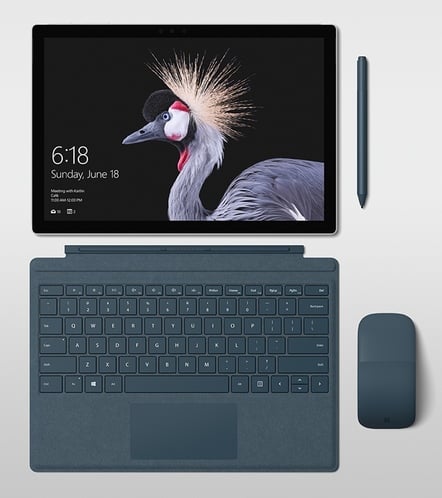
The 2017 Surface Pro (no numbers any more) looks almost identical to 2015's Surface Pro 4, but the battery lasts longer, and it's even more eye-gougingly expensive. Older peripherals for the SP4, like the power supply, the Dock, the fourth-gen Type Cover keyboard and the Pen continue to work, but a Pen is no longer included in the box gratis. It will have an LTE SIM card slot, but not yet. And that's about it for the main features. Some tl;drs are harder to write than others. This is one of the others.
The downsides?

Surprisingly, the port selection remains stuck in 2015, more or less: no Thunderbolt or USB-C. There's still only one USB-A port. Battery life is better, but still not great. The perennial problem of glossy touch displays is greasy paw prints, and again you may think about applying your own layer of oleophobic coating. And the price... oh, the price.
The Surface is almost a kind of Veblen good – the more expensive it is, the more people want it!

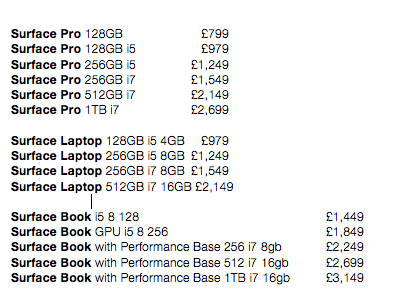
If you don't have a Surface Pro, I suspect the price is why. You're spending your own money and want better value and a more robust, albeit larger machine, or you haven't been able to get someone to buy one for you. Bear in mind in the table above, it's another £149 for a matching Alcantara keyboard and maybe even £99.99 for a stylus too. Forget the m3 model and it's crazy to buy a "Pro" machine with less than 8GB of RAM. That's topping £1,500.

But if you can get one, you're going to enjoy it a lot. One reader in the comments on my Surface Laptop review reports that at work, given the choice, 90 per cent of staff plumped for a Surface Pro and my only surprise is what were the other 10 per cent thinking?

Here's what I liked about the Surface Pro 2017 edition. Primarily it's the size and weight. I personally rate this over the machine's 2-in-1 versatility (although that too is a big appeal, the sound is great for catching up on TV). It slips into a reporter's bag – remember, it's a 12.3-inch diagonal display – and when you take it out you're working pretty quickly. The 3:2 aspect ratio is greatly underrated, and for both reading and writing documents, 3:2 is preferable to 16:9.

The display resolution remains unchanged, at an insane 2,736 x 1,824.

I also liked the Alcantara keyboard, now with better (1.5mm) key travel up from 1.3mm, with the strange smoothed fabric you get on the Surface Laptop. The Surface Pen has been given a luxury makeover with and now comes at £99.

Browsers


1 Grammarly for Chrome

From Grammarly: Grammarly's free writing app makes sure everything you type is easy to read, effective, and mistake-free. Adding Grammarly to Chrome means that your spelling and grammar will be vetted on Gmail, Facebook, Twitter, Linkedin, Tumblr, and nearly everywhere else you write on the web. Once you register your new account, you will start to receive weekly emails with personalized insights and performance stats (one of our most popular new features). Working on a large project, an essay, or a blog post? No sweat. You can create and store all of your documents in your new online editor.

What's new in this version:

Version 14.785.1038 may include unspecified updates, enhancements, or bug fixes.

Link1    Link2


2 Google Chrome (64-bit)

From Google: Google Chrome is a browser that combines a minimal design with sophisticated technology to make the Web faster, safer, and easier. Use one box for everything--type in the address bar and get suggestions for both search and Web pages. Thumbnails of your top sites let you access your favorite pages instantly with lightning speed from any new tab. Desktop shortcuts allow you to launch your favorite Web apps straight from your desktop.
Google Chrome is in the Web Browsers category of the Browsers section.


What's new in this version:

This release contains a number of security fixes.

Link1    Link2


3 Mozilla Firefox 64-bit

Mozilla Firefox is a fast, full-featured Web browser. Firefox includes pop-up blocking, tab-browsing, integrated Google search, simplified privacy controls, a streamlined browser window that shows you more of the page than any other browser and a number of additional features that work with you to help you get the most out of your time online.

Mozilla Firefox is in the Web Browsers category of the Browsers section.


What's new in this version:

Today's release brings innovative functionality, improvements to core browser performance, and more proof that we're committed to making Firefox better than ever. New features include support for WebVR, making Firefox the first Windows desktop browser to support VR experiences. Performance changes include significantly faster startup times when restoring lots of tabs and settings that let users take greater control of our new multi-process architecture. We've also upgraded the address
Link1    Link2


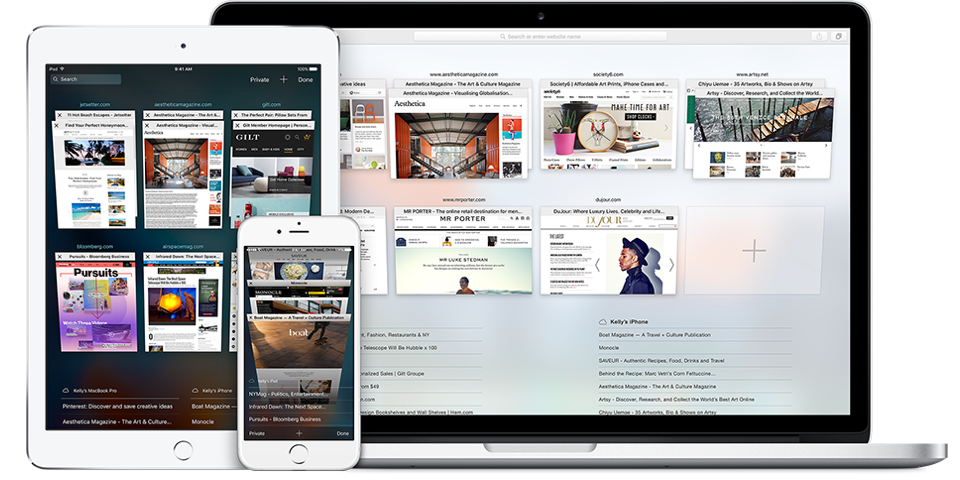
4 Apple Safari

Safari is Apple's stylish, easy-to-use Web browser for its Mac OS. Safari for Windows lets PC users try Safari for themselves. Safari is a great way for Windows users to take a bite of the Apple since, as a Web browser, it can only be so different from the Big Three; IE, Firefox, and Chrome. We tried Safari 5 in Windows 7. Its new features include the Reading List, which collects Web links and bookmarks that you want to check later.

Safari's page layout shows how much Web browser functionality dictates form these days. Safari for Windows is plain but clean and intuitive, with many similarities to other popular browsers as well as some differences. For instance, the address bar searches the History rather than using your default search engine. Safari has a separate search field instead. The Settings icon opens an extensive menu that includes private browsing, pop-up blocking, Extensions, and customization buttons. One feature we really like is the Page icon that displays a menu just for the current page. The Bookmarks bar holds icons to show the Reading List, Top Sites, and All Bookmarks. Clicking Preferences under Settings opens a tabbed dialog with many more options, including Appearance, Tabs, Security, Privacy, Extensions, and RSS.

Safari has a good reputation, and we found it to be quick and stable. We started with some news sites, moving through some of our imported IE Favorites and finishing with some random searches. Unlike some of Apple's software, Safari is more like the competition than unlike it, with tabbed browsing, a customizable toolbar, and security and privacy options. Some things are missing; for instance, Safari for Windows can import Favorites from Internet Explorer into its bookmarks, but apparently the same isn't true for Firefox or Chrome bookmarks. You can always export your Firefox or Chrome bookmarks to IE and then into Safari, but being able to import them directly would be a better option.

At any rate, if you've wondered about Safari, here's your chance to see it for yourself.

Link1    Link2


5 LiveTV Toolbar

This free, feature-rich toolbar gives instant access to live television around the globe, although connections aren't always reliable. Live TV toolbar offers a customizable interface with standard buttons for quick weather forecasts, a pop-up blocker, tracks clearing, e-mail (Hotmail, Yahoo, Gmail, and POP3 accounts), videos and, oh yeah, TV stations. TV stations can be selected by category (sports, news, kids, shopping) or by country, though the number of stations available varies by country. When it came to actually viewing television stations, more often than not, the toolbar ran into unavailable streams or simply failed to connect. In contrast, buttons for top videos on Google Video, Metacafe, and YouTube are a boon and open without any problems. We were able to listen to several radio stations and add others to the toolbar list. Buttons that you don't need can easily be removed and you can even add others to quickly launch other programs such as Microsoft Word, Excel, Outlook, and MSN Messenger. Alas, this toolbar add-on for Internet Explorer is only dependable when using typical features found in similar applications, so users may want to look further for a more operative toolbar.
Link1    Link2


Sunday, August 6, 2017

Information flash: The 'Apple View vs. Android Wear' fight is not and will certainly never be considered a real point


Boy, oh young man -- the Internet positive does love a very good smackdown.

With word of which Apple's long-awaited Apple Enjoy is set going to retail store shelves in April, typically the World Wide EchoTubes usually are filling up with just about all the headlines you'd assume -- anything and almost everything linked to the Apple compared to. Android "smartwatch war" in addition to which company's wearables may "win the battle. inches

I hate to end up being the bearer of negative news, but listen strongly: Smartwatches are not typically the same as smartphones. Besides silly fanboy arguments in addition to meaningless analyst ramblings, there is not any direct Apple Watch or Android Wear rivalry. Not necessarily in any way that is actually relevant in typically the real world.

Think concerning it to get a minute: Together with smartphones, consumers actively help to make a choice. Do I actually want an iPhone, or perhaps do I prefer a single of the Android-based alternatives? Anyone looks at the gadgets and/or the platforms in addition to decide which appeals typically the most to you.

Smartwatches -- in the Android os Wear and Apple Enjoy context, no less than -- may work doing this. No a single is going to go walking into a shop and point out, "Hmm. Do i need to buy typically the Apple Watch or a great Android Wear watch? Which often do I like far better? "

Enjoy closely: Android Wear gadgets like the Moto fish hunter 360 (left) won't compete in opposition to the Apple Watch (right)

The reason is basic: Both the Apple Enjoy and Android Wear wrist watches are designed to job is without a doubt their respective programs. Problem isn't which smartwatch someone will want to be able to buy but rather if the consumer wants to acquire a smartwatch in typically the first place. The The apple company Watch is relevant simply to those who very own iPhones and are put in in the Apple environment; Android Wear watches usually are relevant just to those fully commited to Android.

And why don't be honest: As regarding now, no smartwatch is usually a "must-have" gadget. That is a luxury accessory -- a new neat tech toy of which supplements your phone and provide you a more easy way to handle capabilities you already have. That can certainly be beneficial, but it's by zero means essential.

The genuine "battle, " then, isn't very involving the Apple Watch in addition to Android Wear. It's within just each platform -- typically the battle to convince buyers that they need to drop their particular hard-earned cash on a new wrist-based accessory for your telephone they have. And that is a battle each business will probably be fighting on their own.

Living with Chromecast Audio: A brilliantly simple audio streaming solution


The block means machines powered by these newer processors will no longer be able to receive crucial security updates.Comments ');IDG.GPT.addDisplayedAd("gpt-pin", "true");IDG.GPT.addLazyloadedAd("gpt-pin", "true");document.write('');googletag.cmd.push(function() { googletag.display('gpt-pin'); });//-->
I've always wanted to have my whole home connected to a smart streaming-audio system -- one that'd let me take my music from room to room and play anything I want anywhere in the house, using any phone or tablet to control it.

The problem is that I've never found a system that makes it easy and doesn't cost an arm and a leg. Sure, there's Sonos, but you're looking at quite the investment to get multiple rooms up and running with that -- $200 to $500 for each connected speaker and $350 to $500 for adapters that let you bring existing "dumb" speakers into the equation. Those numbers add up fast -- and as tempting as it is, I've never been able to convince myself (or, ahem, my wife) that it's a good idea to drop that much dough.

(Sonos also generally requires you to use the company's own Android app to control music playback, and there's no universal Web interface for playing music from a laptop's browser -- two asterisks that don't exactly sweeten the deal for me.)

Two weeks ago, I finally found the solution I'd been waiting for. Yup: I'm talking about Google's new Chromecast Audio -- a simple little $35 device that lets you turn existing speakers into smart speakers and then stream audio to them using the apps already on your phone, tablet, or computer.

I went to the nearest Ye Olde Electronics Retailer and picked up a few Chromecast Audios of my own shortly after Google's announcement last month, and I've been using 'em in my home ever since. And let me tell you: I'm pretty darn pleased with how things have turned out.

Getting started with Chromecast Audio
First things first: Chromecast Audio isn't going to be for everyone. Just like the regular Chromecast (which connects to a TV and handles video as well as audio), it plugs into existing equipment and makes it ready for Internet streaming. That means you need to have your own speakers in order for it to do you any good. Sounds obvious, I realize, but it's worth emphasizing.

Chromecast Audio will work with any powered speaker or speaker system, as long as it has a 3.5mm input, an RCA input, or an optical audio input on it. So you could use it with a stereo, a bookshelf or Bluetooth speaker, or even an old-school boombox, provided it has the right kind of jack available.

(The good folks over at Android Central put together a nice list of speakers that cost less than $35 and will work with Chromecast Audio, if you need to fill in a few gaps.)

Me? I connected two of 'em to standalone speakers I've had sitting around for ages and then moved those into our bedroom and kitchen. I connected a third to a dusty old stereo system I acquired from a relative's basement and then set up in our "dining room" (heavy emphasis on the quotes there). Our main living room stereo is hooked up to a TV that already has a regular Chromecast connected, so I'm not putting a Chromecast Audio on it for now (though that may change eventually -- more on why in a minute).

The setup couldn't be simpler: You just plug the Chromecast Audio into your speaker (or receiver, in the case of a stereo system) and then plug it into an outlet for power. The device comes with a short cable for 3.5mm connections; if you want to go the RCA or optical route, you'll need to buy your own cable for that (and it'll need to have a 3.5mm connector on one end, as that's the only kind of jack present on the Chromecast Audio device).

Once you're all hooked up, you open the Chromecast app on your phone or tablet (or download the desktop-based setup utility). The app will find your new connection and walk you through a couple quick steps to get everything up and running. We're talking a minute or two for each speaker -- really couldn't be much simpler.

Let the casting begin
And with that, you're ready to rock and/or roll. Any Android device or computer signed into your Wi-Fi network will be able to cast audio to any connected speaker or stereo; all you've gotta do is tap the cast button in a compatible app and then select where you want the audio to play. (You can also allow casting from devices not signed into your Wi-Fi network via a PIN-based guest mode, if you're so inclined.)

When I tap the cast button in Google Play Music on my phone, for instance, I see this list of options:

I then just tap whichever option one I want, and ta-da: Anything I play is directed to that speaker. The audio streams directly to the Chromecast Audio device, too -- as opposed to playing on or from my phone -- so there's no real impact on my phone's battery life, nor are there any connectivity issues or playback gaps like you frequently experience when using Bluetooth connections.

If you're using an app that doesn't have native Chromecast support, you can opt to mirror all of the audio coming out of your mobile device or your computer's Web browser and cast that to a speaker instead. With all the apps that have Chromecast support these days, it's not something I've found any real need to use -- but it's nice to know the workaround exists (and seems to work quite well, too).

What's been great about Chromecast Audio for me and m'ladies (both wife and daughter -- she may not be able to operate a smartphone yet, but she sure does enjoy the music we play from them) is the simplicity of being able to easily move our music to wherever we happen to be in the house. Feeding the baby in the dining room? Open up Google Play Music, tap the cast button, tap Dining Room. Bam. Music playing.

Time to head into the kitchen to work on our dinner? Open Play Music again, tap the cast button, tap Kitchen. Bingo-bango. The tunes keep going.

You get the idea.

It's only going to get better
If that were all Chromecast Audio could do, I'd be happy. But things should get even cooler later this year, when Google is scheduled to add the ability to cast to multiple Chromecast Audio destinations simultaneously. In other words, I could tell my phone to send my "Best of Toto" playlist to both the kitchen and the dining room at the same time. Or to the living room and the bedroom. Or, you know, whatever combination seems appropriate at any given moment.

(Just kidding about having a "Best of Toto" playlist, by the way.)

(Though now I'm wondering if maybe I should work on one of those.)

(Except that it might have only one song. Maybe two. And "best" might be too strong of a word to describe that music.)

The multiroom casting feature should be huge. It'll basically turn Chromecast Audio into a build-your-own Sonos type of setup (provided, course, that you have or are able to obtain your own speakers). And that's why I might eventually pick up one more unit and throw it onto my living room stereo, as I want that to be a part of the multiroom playback menu once that feature's available -- and the regular Chromecast there now might not allow that, since it connects via HDMI and relies on active video to operate.

Even in its current form, though, this inexpensive little gadget is exactly the sort of answer I've been waiting for -- a brilliantly simple solution to a problem that's been overcomplicated for far too long (déjà  vu, anyone?). The addition of multiroom playback will only be icing on the cake.

If you're like me and have extra speakers that you wish you could easily use for streaming from your various devices, I wouldn't hesitate to pick up a Chromecast Audio -- or, heck, a few of 'em -- today.Â